Interactive 3D Slime
A Codex + GPT-6 tutorial for building a squishable, translucent WebGPU gel slime in Three.js, with the full prompt set included.
- author
- Orange Cat Panpan
- models
- gpt-6 (via Codex)
- stack
- Three.js r180 · WebGPU (TSL)
- version
- v0.8
- platforms
- WebGPU browsers (Chrome 152+)
- fps
- 59.4 FPS idle · 59.3 FPS active
- bubbles
- 640 instanced spheres
- price
- Free · prompts included
- published
- 2026-09-23
- updated
- 2026-09-23
What it is
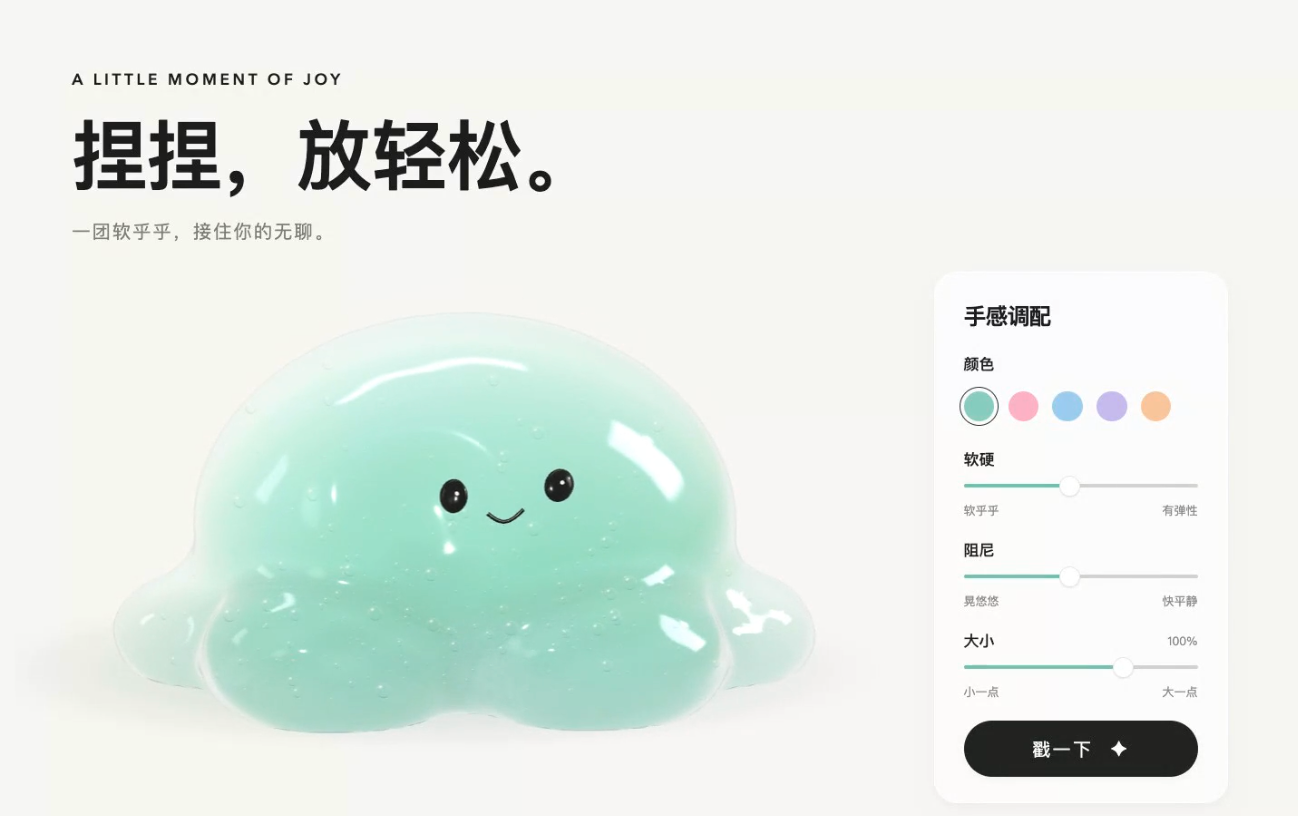
This is a chapter-by-chapter tutorial that walks you through building a squishable 3D gel slime as a real browser toy using Codex + GPT-6, Three.js and native WebGPU. It is a genuine 3D scene — meshes, lighting, physical materials and a camera — rather than an image pasted onto a canvas: the two black bead eyes and tiny mouth are anchored to the front surface of the same mesh and deform with the body when you press, drag upwards and release.
The finished page pairs a warm-white stage with a control panel offering five color schemes, stiffness, damping, scale (65%–115%) and a "Poke" button. A complete prompt set is included at the end, one block per chapter.
Core value proposition
The tutorial's selling point is that the squish is real: a lightweight spring model drives a single continuous mesh, so the face and highlights move with the surface instead of sliding over it.
- One continuous gel mesh: a dome primitive is blended with several bottom ellipsoids via Marching Cubes, giving a soft spreading base with real volume and curvature.
- Conforming facial features: eyes and mouth are projected from the front surface and share the exact
deform()pass and normal updates as the body. - WebGPU-only translucency:
MeshPhysicalNodeMaterialplus TSL nodes combine absorption tint, thickness, low roughness and studio reflections, with 640 instanced micro-bubbles for interior depth. - Reusable prompt set: five chapter prompts — goal & mockup, page & render entry, mesh & translucency, interaction & physics, packaging — that can be fed to Codex one at a time.
What it can replace
| Target approach | Feasibility | Verdict & use-case context |
|---|---|---|
| Pre-rendered 3D product clips | High | Replaces baked mp4 loops for hero visuals with a real-time canvas that responds to the pointer. |
| Pasting a 2D mascot image onto the canvas | High | Replaces the fake-3D shortcut with a mesh whose face and specular highlights deform together under pressure. |
| Game-engine prototypes (Unity/Godot) | Partial | Covers a single-object interactive toy in the browser without an engine or build step; not a substitute for full gameplay. |
| Physics sandboxes (matter.js/rapier) | Moderate | Handles a stylized spring-and-gravity soft body cheaply; not accurate rigid-body or cloth simulation. |
| Stock 3D asset marketplaces | Low | The slime is fully procedural and buys no models, but bespoke characters still need modelling tools. |
Current realities and limitations
- WebGPU is a hard requirement: there is no WebGL fallback and Three.js's automatic downgrade is disabled on purpose, so unsupported browsers see an error and controls are disabled.
- Pinned to a specific version: the build pins Three.js 0.180.0 / r180 and touches internal properties (
_getFallback,backend.isWebGPUBackend), so a version bump can break the backend assertion. - Desktop-class target: the benchmarks were taken on an M4 Pro with a 990×720 canvas; mobile and low-end GPUs are not characterised.
Verdict
Primary recommendation
A strong template for developers who want a real, deforming 3D toy in the browser — and a clean reference for pinning native WebGPU instead of silently falling back to WebGL.
Development lifecycle and iteration loop
The build follows the same loop the article teaches: pick a reference mockup, then hand Codex one chapter at a time, compare the result against the mockup, and iterate. Form comes before material — the mesh and its facial features are fixed first, then the transmission shading and bubbles.
| Stage | Model used |
|---|---|
| Concept mockup & visual baseline | GPT-6 image generation |
| Layout & native WebGPU initialization | Codex · GPT-6 |
| Mesh, conforming features & translucency | Codex · GPT-6 |
| Interaction & physics tuning | Codex · GPT-6 |
| Reproduction & packaging | Codex · GPT-6 |
Metrics and monetization
Benchmarks for v0.8 were recorded on an M4 Pro / 48 GB, Headless Chrome 152 / Metal 3, 1440×1000 viewport, 990×720 canvas, DPR 1: 59.40 FPS idle over 10.02 s, 59.26 FPS during continuous interaction over 13.50 s, and a P95 frame time of 16.8 ms.
There is no monetization: the tutorial is distributed for free, with the complete prompt set included for reuse.
Key debates and reproducibility
The deliberately non-negotiable stance is WebGPU-only. Three.js's standard WebGPURenderer can silently fall back to WebGL 2, so the tutorial checks the class name and asserts renderer.backend.isWebGPUBackend; if a device is unavailable it shows an explanation instead of degrading. That is a clear trade-off: real native rendering and cleaner shader code in exchange for a narrower device reach.
Reproducibility is the point of the format: the five prompts are ordered so the build can be replayed chapter by chapter, and the reference mockup gives every step a fixed visual target to compare against.
The complete prompt set
Feed these prompts to Codex in order, one chapter at a time. The mockup from Prompt 01 is the calibration reference for every later chapter.
Prompt 01 · Goal & visual mockup
Please build an interactive 3D slime webpage in the current project using Three.js and native WebGPU. WebGL fallbacks or auto-downgrades are strictly prohibited.

First, generate a full-page concept mockup image, saving both the image and the generation prompt, and wait for my confirmation before implementation. (If no image tool is available, use the target reference image provided.)
The page layout requires a clean warm-white background, a bold Chinese headline "捏捏,放轻松。" ("Squish, relax."), and subtitle "一团软乎乎,接住你的无聊。" ("A squishy companion for your downtime.").
On the left: a semi-transparent mint-green gel slime with a dome top, plump spreading base, fine internal bubbles, studio light strips, and subtle contact shadows. Two small black bead eyes and a mouth conform tightly to the front surface.
On the right: a rounded control panel providing options for color, stiffness, damping, scale, and a "Poke" button. Ample negative space, free of clutter.

The final character must support localized squishing, upward dragging, elastic rebound upon release, and gentle floor landing, with facial features deforming seamlessly with the surface. Target 60 FPS and verify on real hardware upon completion.
Prompt 02 · Page & render entry
Create a runnable webpage based on the chosen mockup. Use warm-white background #F8F6F3, bold typography, a left 3D canvas stage, and a right control panel (repositioned below on mobile/narrow screens).
Organize the project cleanly into separate files: page layout, mesh generation, soft-body physics, and WebGPU initialization. Retain the reference design without faking 3D by pasting the image onto the canvas.

Pin and locally bundle Three.js 0.180.0 / r180. Request a native WebGPU device, disable this version's automatic WebGL fallback mechanisms, and verify the active backend after renderer initialization.
If using internal properties, document version constraints explicitly.
Display a user-facing explanation, disable controls, and stop execution loops if WebGPU is unavailable, fails initialization, or loses context.

Spin up a local server, provide the local URL, and confirm in an actual browser that the scene loads cleanly without creating a WebGL context.
Prompt 03 · Mesh, facial features & translucency
Construct a smooth, continuous 3D gel mesh following the target reference, ensuring a rounded dome, soft plump base, and adequate volume depth. Do not substitute with a standard rigid sphere.
Generate eyes and mouth anchored to the front surface coordinates, sharing the exact deformation logic and normal updates as the body to maintain smooth continuous highlights across the face.

Implement WebGPU-compatible physical transmission materials combining absorption tint, thickness maps, low roughness, and soft environment reflections to achieve luminous turquoise gel. Control overhead using instanced meshes for internal micro-bubbles.
Keep the base clearer and lighter using local rest coordinates so regions remain stable during stretch and drag actions.

Lock camera, viewport, base color, and scale, capture an actual browser screenshot, compare contours, volume, and translucency against the reference, and polish subtle details.
Prompt 04 · Interaction & physics tuning
Implement localized compression, dragging, elastic rebound, and subtle ground collision. Ensure body, facial features, and specular highlights share the deformation pipeline, updating a lightweight spring-damper-gravity system at a fixed timestep.
Implement 5 preset colors, stiffness, damping, 65%–115% scaling, and a "Poke" action. Scale operations must synchronously update coordinate mapping for raycast hits.
Handle pointer cancellation, blur, and rapid inputs gracefully to prevent stuck drag states or elements flying out of view.

Include a gentle breathing jelly loader during initial asset preparation, transitioning smoothly once the GPU completes its first-frame overhead before enabling user controls. Respect 'prefers-reduced-motion' settings.

Thoroughly test interactions, color variations, boundary scale values, mobile views, and error states. Profile and report sustained FPS (both idle and active), recording device specs, browser version, viewport size, DPR, sample duration, and any 95th-percentile frame drops.
Prompt 05 · Reproduction & packaging
Organize and validate this 3D slime project so it can be reproduced reliably on other environments.

Bundle index.html, styles, src/ source files, local vendor dependencies, and licenses into a complete ZIP alongside an absolute-path-free README.
Document prerequisites, local launch commands, URLs, port collision workarounds, and clean exit procedures, emphasizing hard WebGPU requirements.
Perform a clean-room run directly from the unpacked archive to verify zero missing dependencies.

Record a brief browser screen capture demonstrating press, drag, drop, recolor, and poke interactions.
Include a side-by-side comparison between the initial reference image and current WebGPU rendering, noting visual discrepancies and measured performance criteria.
Provide live demo URLs, download links, and insert the reusable chapter prompts sequentially into the documentation.