Code Film Studio
Thirteen open-source repos that fit together into a working video studio — deconstruct a reference film, pick a style, render in code, composite the effects, and export with ffmpeg.
- repositories
- 13 · all open source
- stars
- 634K combined (2026-11-21)
- styles
- 99 code-rendered film styles (Lemo-Opuscar)
- effects
- 244 pixel FX (PixelFX) · 308 compositing effects (EffectCraft)
- prompts
- 703 prompts · 418 with live remakes
- price
- $0 to start · tokens, GPUs and Remotion company licenses are the real cost
- time
- About half a day for a 40-second film once the stack is installed
- requires
- Claude Code or Codex · Node 20+ · ffmpeg · Python 3.10+
- published
- 2026-11-21
- updated
- 2026-11-21
Contents9 sections · 0 items
Thirteen repos, one production line
The list went around X twice last week: thirteen GitHub repositories that supposedly turn a coding agent into a film studio. Ninety-nine styles, 244 effects, 703 prompts, zero dollars.
Read as a list, it is a pile of bookmarks. Read by what each tool does to a frame, it becomes a straight line: something that tells you how the reference was made, something that decides what your film looks like, something that writes the frames, something that adds the sparks, something that exports the file.
That is the order below. Every number in this piece was checked against the repository, its README or the author's own benchmarks on 2026-11-21, and every claim about quality comes from someone who actually shipped with it.
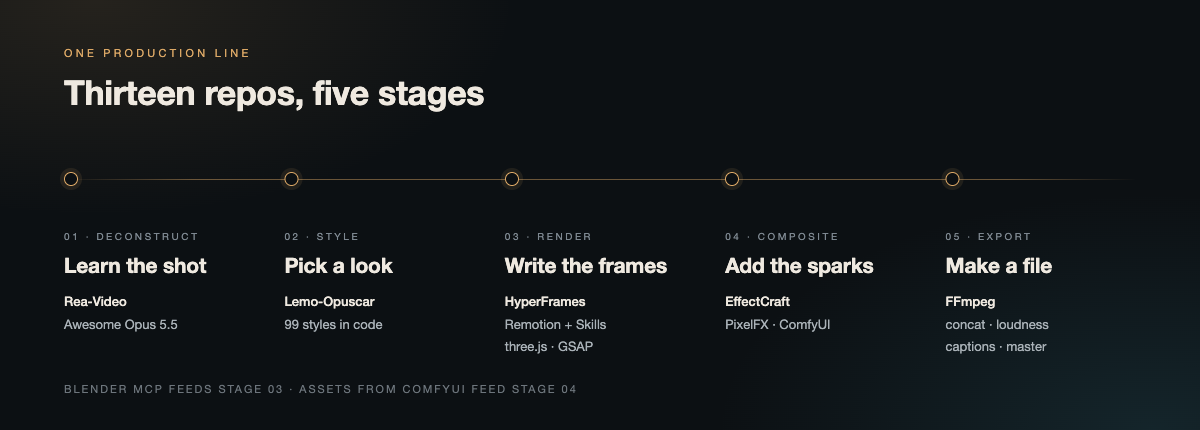
The five stages this piece is organised around. Every repo below belongs to exactly one of them.
What the stack actually gives you
- A map of the reference, not a copy of it. Rea-Video splits a finished video into shots and judges each one: filmed, AI-generated, 3D, coded motion graphics, or screen recording. It then writes a shooting plan, per-shot prompts and a
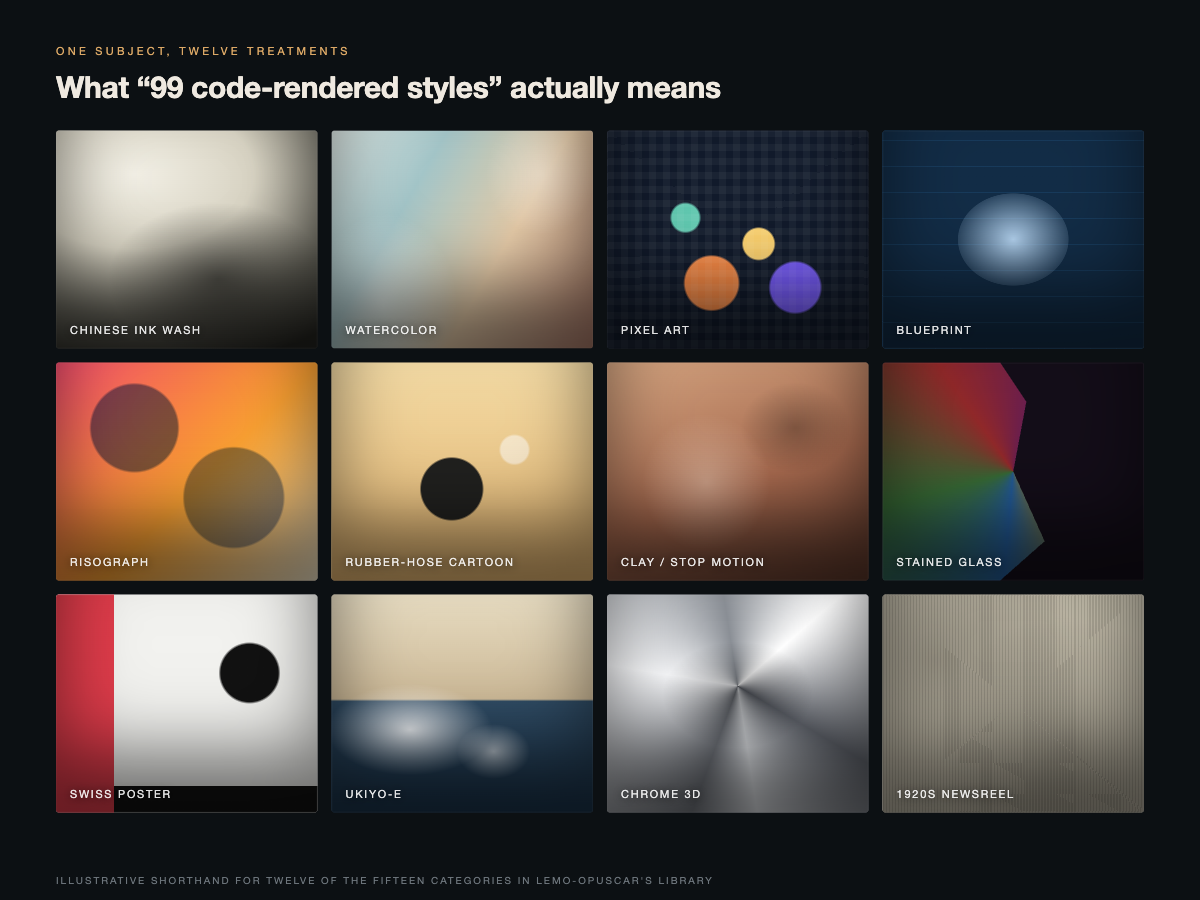
VIDEO.mdyour agent can keep working from. - A look you did not have to invent. Lemo-Opuscar ships 99 named styles in 15 categories, each with a demo film rendered in code, so you pick by eye instead of by adjective.
- Frames you can diff. HyperFrames turns HTML/CSS/JS into deterministic MP4s, and Remotion does the same for React components. Both leave you a project file a human can edit, which is the difference between an AI video and an AI video you can fix.
- Motion primitives that already work. GSAP for type and DOM, three.js for real 3D, PixelFX for pixel-art hits, EffectCraft when you need a compositor, ffmpeg for everything at the end.
What it replaces
| Target software | Feasibility | Verdict & use-case context |
|---|---|---|
| Adobe After Effects | Partial | EffectCraft mirrors AE's panels, shortcuts and expressions and carries 308 effects, but its own README calls it alpha and "not recommended for production client work". Fine for titles, lower thirds and transitions. |
| Premiere Pro / DaVinci Resolve | Low | Nothing here is a timeline NLE. Remotion and HyperFrames are renderers and ffmpeg is a command line; the edit itself is still yours. |
| AI video generators (Sora, Veo, Kling) | Low | These repos do not generate footage. Rea-Video tells you which shots need a generator and writes the prompts — you still pay the model. |
| Blender, by hand | Partial | Blender MCP drives bpy from an agent. Strong on procedural placement and batch work, weak on art direction. |
| Stock footage and asset libraries | Moderate | HyperFrames bundles stock images, music, SFX and TTS; the rest assumes you bring your own material or generate it. |
| Figma-to-motion handoff | Moderate | Code-rendered styles and GSAP remove a lot of after-design animation, but no repo imports a design file cleanly. |
Where each repo earns its place
| Repository | Layer | Use it when | It will not |
|---|---|---|---|
| Rea-Video | Deconstruct | You found a video you want to learn from | Shoot the live-action shots for you |
| Awesome Opus 5.5 Videos | Reference | You need proven prompt-to-motion starting points | Give you a story or a script |
| Lemo-Opuscar | Style | You want a finished look without designing one | Work well outside Claude models |
| EffectCraft | Composite | You need keyframes, expressions and AE muscle memory | Survive a client deadline yet |
| PixelFX | Effects | The shot is pixel art or a game trailer | Help a live-action plate |
| ComfyUI | Assets | You need generated stills, textures or keyframes | Stay stable across plugin upgrades |
| Remotion | Render | The video is a React component with data behind it | Be free for companies over three people |
| Remotion Skills | Render | Your agent keeps writing Remotion wrong | Replace reading the docs |
| HyperFrames | Render | Your agent writes HTML faster than React | Produce a 90-point film in one pass |
| three.js | 3D | You need particles, volumetrics, real materials | Design the scene for you |
| GSAP | Motion | Text has to fly, bounce or slide in | Animate a 3D scene |
| Blender MCP | 3D | The work is procedural or batch modeling | Judge whether a render looks good |
| FFmpeg | Export | Anything has to become a file | Be optional |
Current realities and limitations
- Zero dollars is a starting price, not a total. Remotion is free for individuals and companies of up to three people; beyond that it is $25 per seat per month or $0.01 per render with a $100 monthly minimum. Lemo burns tokens for 30–60 minutes per film. ComfyUI is free software that wants a GPU. Rea-Video's best accuracy needs a vision model you pay for.
- The free compositor is honest about being unfinished. EffectCraft's README puts it at 91% feature parity and roughly 45% of the way to professional production, with macOS the most tested platform. One user's benchmark: a 65-second vertical film exported in about 12 minutes from a 150 MB app, while After Effects ran out of memory on the same 64 GB machine.
- One-click is a myth worth naming. The most-liked criticism of this stack says plainly not to believe HyperFrames or Remotion will cut a high-quality video for you automatically. What they remove is the editing software, not the directing.
- Accuracy collapses on recompressed footage. Rea-Video's offline tools hit 88.6% on WeChat-recompressed clips and 99.6% with a vision model added; one unboxing case was called 35% AI by the offline pass and turned out 97% live-action after an agent looked at the frames.
- Context is the real budget. Installing all thirteen at once floods the agent with skills it cannot keep straight. Three at a time is the working limit.
Verdict
Primary recommendation: start with three repos — Rea-Video to learn the structure, HyperFrames to render it, ffmpeg to finish it. Add the rest only when a specific shot demands it.
The list is real, but it is a production line, not a studio in a box. What it removes is the software bill and the six-month learning curve. What it does not remove is the part that decides whether anyone watches: a reference worth stealing from, a style that fits the story, and the willingness to re-cut the thing four times.
A 40-second film, stage by stage
| Stage | What happens | Time |
|---|---|---|
| Deconstruct | Rea-Video splits a reference into shots and hands back timing, captions and a shooting plan | 15 min |
| Style | Pick a Lemo style, or lift one motion prompt from the Awesome list | 10 min |
| Build | HyperFrames scaffolds the HTML timeline; three rounds of fixes | 30 min |
| 3D and type | three.js for the hero shot, GSAP for the titles | 1 hr |
| Composite | EffectCraft or PixelFX for transitions and hits | 20 min |
| Assets | ComfyUI for keyframes and textures | 20 min |
| Export | ffmpeg for concat, loudness, captions and the final master | 5 min |
Half a day, once. The first install is the slow part: an agent, Node, ffmpeg, Python, and one plugin per tool.
Metrics and cost
| Line item | What it costs |
|---|---|
| The 13 repositories | $0, mixed Apache-2.0, MIT and GPL-3.0 |
| Agent subscription | $20–200 per month, depending on plan and usage |
| Lemo-Opuscar film | 30–60 minutes of agent time, token-heavy |
| Remotion, company license | $25 per seat per month, or $0.01 per render |
| ComfyUI | $0 software, real GPU and electricity |
| Optional video model | Per generation, from your chosen provider |
Combined GitHub stars across the thirteen repos: about 634,000, led by ComfyUI at 147.8K, three.js at 119K and HyperFrames at 87.5K. Seven of the thirteen were created in 2026 — this is a stack that did not exist a year ago.
Community reception and the debates worth reading
The praise is specific, which is a good sign. A Japanese user built a lyric music video with Opus 5.5 driving EffectCraft over MCP without touching the app, reported near-perfect lyric timing, and noted the whole session used about 5% of a weekly Claude quota. Another user benchmarked EffectCraft against After Effects on the same machine and still chose not to put it into client work — 150 MB versus 5.4 GB, 12 minutes versus a memory crash, and a fair verdict that it is "good enough for most things, too risky for work."
The skepticism is specific too. The most-shared counterpoint argues that one-click AI video is a myth and that the people getting good results are the ones running Claude plus Remotion through a real script, storyboard and edit pass. That matches what the repositories say about themselves: Rea-Video insists on rights-cleared material, EffectCraft labels itself alpha, Remotion publishes a license page instead of pretending to be free for everyone.
One warning belongs in any list like this. In October a repository impersonating Blender MCP appeared, one letter off the real author's handle, with copied issues and a plugin that pulled code from another repo on first launch. The real project is ahujasid/mcp-for-blender. Check the author and the commit history before you install anything an agent recommends.
Sources
- [1]
- [2]
- [3]
- [4]
- [5]Remotion license and pricingRemotion
- [6]
Related cases
- → Awesome AI Creative GalleryResource
- → Motion PromptResource
- → 369 AI Video Projects for Coding AgentsResource